
 InsidePics
Your photos. Encrypted before they ever leave your phone.
InsidePics is a private photo and video app for iOS and Android. Everything in your library is encrypted on your device, so the people you share with can open your photos — and nobody else can, including us.
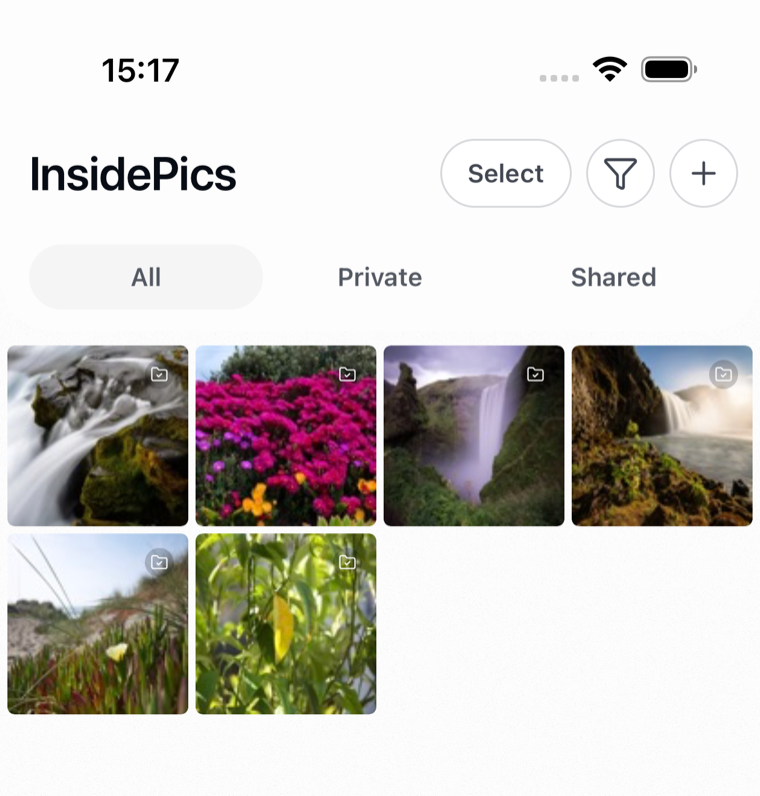
A photo library that stays yours
Most photo apps ask you to trade privacy for convenience. InsidePics is built so you don't have to: the encryption is automatic, and the sharing is deliberate.
Private by default
Every photo and video you add is encrypted on your device before it is uploaded. Nothing is shared until you choose to share it.
Share with specific people
Share a single photo or a whole album with the people you pick. No public links, no accidental audiences — and you can stop sharing at any time.
Albums that make sense
Group photos and videos into albums, and switch between private and shared views to see exactly what is visible to whom.
Photos and videos together
Import straight from your camera roll. Both photos and videos get the same encryption and the same sharing controls.
Find things fast
Sort by when you added a file or when it was captured, and filter by media type, what you have shared, what friends shared with you, and more.
Built for iOS and Android
A native app on both platforms, with your library kept in sync across your devices — still encrypted end to end the whole way.
Start without an account. Leave without losing anything.
Most photo apps want your email before they will show you anything, and treat leaving as a threat. InsidePics is built the other way round: the account is optional, and deleting it does not cost you your photos.
Open it and start
Skip the sign-up. In guest mode your library is a local vault on your device — add photos and videos, make albums, and use the app straight away without handing over an email address.
Add an account when you need one
Create an account when you want your library backed up, synced to another device, or shared with someone. The photos you already added come with you — nothing has to be re-imported.
Delete it whenever you like
Deleting your account removes your data from our servers and drops the app back to a local vault. It keeps working offline, and your photos stay on your device.
How the encryption works
InsidePics uses public-key cryptography, the same approach used by encrypted messaging apps. Here is the honest version, without hand-waving.
You get a keypair
When you create your account, your device generates an elliptic curve keypair (Curve25519). Your public key is shared so others can send you things; your private key is what unlocks them.
Your private key is encrypted first
Your private key is encrypted on your device before it is stored or backed up. We hold only the encrypted form, along with a recovery copy — neither of which we can read.
Files are encrypted on your device
Each photo and video is encrypted locally before upload. What reaches our storage is ciphertext, not your pictures.
Sharing hands over a key, not a copy
When you share, your device encrypts that file's key to the recipient's public key. Only their device can unwrap it, so access is granted person by person.
Frequently asked
Can InsidePics see my photos?
No. Your photos and videos are encrypted on your device before they are uploaded, and the keys that decrypt them are protected by your private key. What we store is ciphertext. We cannot open it, and neither can anyone who obtains it from our servers.
What happens if I lose my device?
Your private key is stored in encrypted form, together with an encrypted recovery copy, so you can restore access on a new device. Because we cannot decrypt those ourselves, keeping your credentials and recovery information safe is essential — if they are all lost, your encrypted library cannot be recovered.
Who can see something I share?
Only the specific people you share it with. Sharing works by encrypting the file's key to that person's public key, so access is granted individually rather than through a public link.
Which platforms are supported?
InsidePics runs on iOS and Android, and your library stays in sync across the devices you sign in on.
Do you sell or analyze my data?
No. We do not sell personal information, and we do not scan or analyze the contents of your library — the encryption design means we could not do so even if we wanted to. See our privacy policy for the full detail.
How do I get help?
Email us at info@insidepics.com and a person will get back to you. Our support page has the details.